Monday, 25 November 2019

Raising Reading Achievement Site - MIT 2019

Reflections and next steps:
It has come to that time of year where I am reflecting on what I have learnt through this MIT experience. I have had many ups and downs along with big changes throughout the year. I am on track with my reading site with still needing to add some resources sitting in my drive for my site to be fully functional. They purple level for learners reading at 8 years is good to go I am just adding resources to the gold and silver levels. 

End of year data:
I have now looked at my end of year data and can see that all of my learners have made progress this year in reading. I have placed the graphs below where I have shown reading age improvement as well as reading level improvement. The reason I have chosen to use reading level improvement is that some of the reading ages require learners to pass two test and although they may not look like they have improved in reading age they have improved a level since mid year testing.


The blue lines on the graph show end of 2018 reading ages and levels, the red lines show mid year 2019 data and the yellow lines show end of 2019 data. From this you can see that all of my learners have made some progress on paper but I think the biggest progress that I have seen is in the confidence of my learners in reading and the excitement that they have when it comes to reading now. 


The change is huge and really encouraging to see. Looking at the data closely I can see now that there are some who are now stuck at that 9 - 9.5 year range so this is something I will take into consideration and hopefully add to my site as well. 


Presentation:
The original presentation can be accessed from this blog post or can be watched in the video below. 

 
This is my presentation that I completed at the wanaga and have just recorded to show my journey. It is about 8 minutes long so below I will add time points where if you are just interested in my site you can see that, or if you are just wanting to have a look at the data you can go straight to these time points. I have also relinked my site into the post so please feel free to have a look around and let me know if you would like a copy of this to use in your own classroom.

Quick Time Links:
0:22 - 2018 Data 
1:20 - First steps 
2:46 - Screencast Example
4:17 - Mid year data
4:58 - How the site works
6:43 - Next steps and end of year data

Sunday, 17 November 2019

Link to my site - MIT 2019

Reading site update:
I have only just realised that I haven't posted the link to the reading site that I have created. I have put this up now so it is visible for people to have a look at. As we have a reading site on our class page I have been trialling out some of these activities on here so I am yet to upload to this site. I am currently working on having all of these activities on the site ASAP and will definitely have this sorted once I am back from camp next week! I have also had a slight problem with uploading the voice recordings from my learners to the recorded stories section as we have been using screencastify I didn't load these properly into my imovie so will be working to fix this problem as well. Here is the link to the site.

Next steps:
Adding all of the resources from my drive to the site.
Trying to had video instructions for the activities
Please feel free to have a look around the site and use the resources in your own classrooms.


Wednesday, 30 October 2019

Wananga Presentation - MIT 2019

Last week I had the opportunity to present my tool at the 2019 Wananga. we had to complete a pecha kucha style presentation where we had 20 slides and 20 seconds to present each slide. Here is my presentation and I will later add the notes. This was an incredible experience and opportunity to share my journey this year and how my tool has progressed into what I have now. 

Tuesday, 24 September 2019

Term 3 Update - MIT 20!9

Term 3 Update - Raising Reading Achievement

This term I have been working hard to try and get my site up and running to the class so I am not double handling my work as I am currently putting this on my class site as well. I still haven't had this go live to my class BUT they have been using many of the activities that I have been working on after guided reading sessions. So I am making progress! This will be a school holidays top priority so that I will have it ready for day one for term 4. Although it is double handling of work for me at the moment I feel that this is the best way to see how the activities work in my classroom and I would rather that than having a half finished site in action from my students. 

Data:
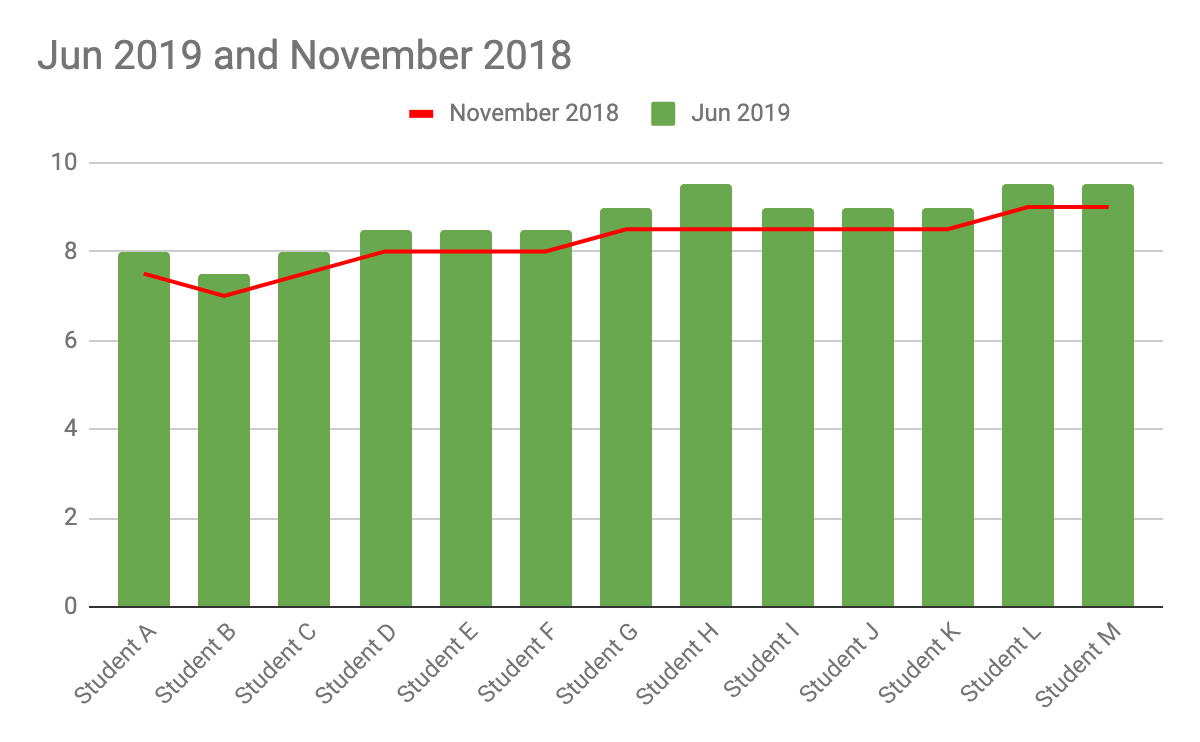
Last time I posted I talked about my data making improvements which has been great to see. I have added a graph of my students data and how much progress they have made this year. 

This is from my mid year testing which has shown an increase in reading age for my target group of students. I am hopeful that this trend will continue with my end of year data as well. 

Highlights from the term:
One big highlight from this term has been the attitude of my students towards their learning. I had one of my students ask to have a reading test as she felt that she had made progress in her reading. She had intact moved from reading at 8 years to 8.5 years which is great progress. However the biggest highlight out of that whole thing was this student taking ownership of her own reading and wanting to see how she was going. She has been working really hard and it has been great to see that her hard work is paying off. 

How is my reading site going?
It is getting there it is still under construction and I do have a little bit of work to do over the holidays to make sure that it is up and running ready for week 1 of term 4. Here is a little look at one of my pages that is complete and ready to go:


This is for comparing and contrasting. My overall vision is that I will have this as a guided reading session in class and we will learn how to compare and contrast as a group. Then instead of having to come up with a task that is directly related to the story or article that they have read they will be able to pick an activity that they will enjoy and be able to continue the learning from our guided reading session. 

The comparing reading log is one that can be used across the term and is an activity that can be used every week to strengthen the reading achievement objective. So that leads onto my where to next which is adding more activities to this site and having it ready to roll in class next term! So watch this space to see when I finally go live with my site! 

Tuesday, 13 August 2019

KPMG Day 3 - MIT 2019

KPMG Day 3 - Raising Reading Achievement

Today we needed to put together what we have been working on and share our ideas at KPMG. This was a great time to reflect on what I have been doing and how my digital tool is coming along. We were asked to cover a few points which allowed my to reflect and think forward to what I need to continue to do to achieve my goal. 

What is the tool and what is it able to do?
It is a google site for students who are reading between the ages of 7 and 9. It will include a range of activities for each achievement objective. After guided reading sessions with the teacher the students will then be able to select from a range activities related to what they have been learning in class. I hope this will give the students the ability to choose an activity that suits how they learn and will be able to maximise their learning. 


Is it making a difference?
So far in my students data from this year I have seen all of my students move up at least 6 months in their reading age or 1 PM reading level. I started the year with a large chuck of my students reading at 8 years and most of them have now made progress to reading at 9 to 9.5 years. So yes there has been some progress in reading age and ability. My students love the new things that we have been doing in class and are engaged with reading and learning. The one thing that many of my students have loved is recording themselves reading and listening back. They reason they love this is they can see how well they are reading and notice the words that they need to work on or parts of their reading that they need to work on. 

How has it evolved?
It has started out as an idea of adding a small few changes to my reading groups to a site where the students can access reading activities. It has now become a place where teachers can have access to resources that are set to specific reading learning intentions and students can have choice as to how they want to practice that skill. They will still have the guided reading session with the classroom teacher and then will have the ability to practice it the best way for them. 

Image result for under constructionWhere to next?
My site is still under construction and I have not made it live to my class yet as there are still many activities that I need to add. But I do aim to have it up and running by the end of the term. I also need to keep uploading my students reading the stories and articles so that others can listen along as an extra way to have access to the text. I will be continuing to add to this for my learners and will aim to have this rolled out in the classroom by the end of term 3. Then the next hope is to have it rolled out to other teachers to use as a tool in their classrooms! So watch this space!

Wednesday, 10 July 2019

EdTeach Summit Day Two - MIT 2019

Image result for New Ideas I came into todays sessions very excited and eager to learn again. We started the day off with a session from Kim Pollishuke which was incredible. Her session was titled Lets build an elevator to the moon. This session was very powerful as it showed that there are no limits in what we are teaching our learners and we should be empowering our learners to feel the same and that their ideas and aspirations should have no limits. This session inspired me as a classroom teacher to show my learners that their learning it limitless as well as what they can achieve which is something that I will definitely being taking back to my classroom.  I want my learners to be encouraged and excited about their learning and know that they possibilities for their education and what they can learn is what they make of it. I learnt how to use many tools in this session to engage my learners and make them feel excited and empowered. 

The next session that I went to was one of Kim Pollishuke's as well. This session was titled DocAppender for Descriptive Feedback Organization. In this session we learnt how to use Google Forms in order to be able to write continued feedback about our learners after sessions or observing them in the classroom. I think this is going to be an extremely useful tool that I am going to be able to use in my classroom. During this session as I my inquiry is around reading I created a from that I can fill in for my learners around literacy and the gains that they are making. After this session I reflected on how we could use this tool in our maths sessions for my team to track progress. I have worked on a basic template which I am very excited to share with my team when I get back to Auckland. 

The second session was one in which I presented again with Hannah West. This was on how to set up a new google site for beginners. This was a smaller turn out but it was great to see a handful of people from the session that we had taken yesterday. In this session we focused more on the create part as gave the people in our session the chance to create a site with the opportunity to ask questions and have support from myself and Hannah. This session again went really well and was nice to be able to share our own knowledge with others. 

The last session that I went to was with Kim Pollishuke and this was titled Putting Stories on the Map. This session appealed to me as reading is my focus and I wanted some extra tools to help it become engaging and exciting. This session was great as I have been using google my maps in the classroom with my learners which showed that it is a great tool to use. This session showed me some new ways of using this tool and how I could use this to locate each learners culture in one single map that everyone could have access to. I also learnt about many new great map tools that can bring reading to life for my learners. 

Today again opened my eyes to the number of tools that I can bring into my classroom and share with my learners as well as my colleagues. I have learnt so much in these last two days which I cannot wait to share with others when I get back. I am so grateful and thankful for this experience and cannot wait for term three to being. I hope that I have inspired others as much as I have been inspired over this conference.   

Tuesday, 9 July 2019

EdTeach Summit Day One - MIT 2019


undefinedMy first day left me feeling excited and ready for what next term has to offer. I learnt so much as I also found that many of the things I am doing are working and I hope to continue this in the terms to follow.

Today was our first day at the EdTech Summit in Sydney. Already in one day my eyes have been opened to other possibilities in my classroom as well as having the affirmation that some of the things I am already using are working. To start the day off we had play ground sessions which were short 10 minute sessions where we were able to see some of the incredible tools that we could be using in our classroom. The sessions that I attended were:


  • Coding for K2-using Beebots - Sharon Cooper
    In this session we were able to experiment with Beebots and how we could use these in our classroom. Coming from a term of using coding with my students this was a great session to see how I could use this coding in real life situations with my learners. This is showing how the coding that they are using is happening with a tangible tool.
  • Simple AR (Augmented Reality) in the palm of your hand - Lorinda Ferry
    This session not only showed the wonder of the cube that we can use but also the incredible tools that are available on Google which can be used with a phone or an iPad. My takeaway from this session was the ability for learners to be able to use iPads in the classroom to show creatures such as sharks in their own reality. Something which I know many of my learners would enjoy.
  • Maths Makerspace - Fiona Thomas 
    As maths has been a new learning step for us as a school using DMiC in our classrooms this session was very helpful with how to make follow up tasks and activities engaging and hands on for our learners. The tool that we use here in one that I could see working in my classroom and have the potential for my learners to solidify knowledge with a hands on experiences. 
After the playground sessions we went right into the 90 minute sessions which opened my eyes to many more possibilities but also showed that what I am using in the classroom is not only working for my learners but is something that many educators around the world are suggesting to be used in the classroom. The first session that I attended was digital storytelling. 

Digital storytelling tools to support diverse range of learners - Fiona Thomas 

In this session we were introduced to a number of different tools that we can use in the classroom to engage learners in literacy. This session was one which made me feel a sense of what I am doing in my classroom is working and some other elements that I could add in. I have been using text to type in my classroom for my literacy program which I think has been working well and this was a tool that was suggested in this session. There are a number of tools that I will be using from this session around language and vocabulary from this session so watch this space as I will update about this as I trial these in my classroom. 

Scratch 3.0 "Make some noise" - Dave Winter

We have been using scratch in our team this term and it was a fairly new tool for me to be using in my classroom. I had already learnt so much about how to teach this for my learners and I am still very eager to learn more which is why I chose this session. Dave's session opened my eyes to even more possibilities with using scratch. Many of my learners love creating music and sound effects which I had no idea was possible on scratch. This session was great as we were able to create our own scratch dance offs and music to go with our scratch games or sprites. This is definitely something I will be using in my classroom.
Image result for cogs in brain
The last session of the day was one in which myself and Hannah West presented together. Our session was tips and trick for new google sites. I felt that this session went really well and we had a great turn our of people. The great part about the session was that people were engaging and asking questions which was what we were hoping for. We touched on our school and showed all of the things that our learners were doing in the classroom and everyone was very interested and excited to see what our learners are achieving.

This gave me a chance to reflect that what we are doing is working and that giving our learners the opportunity to learn, create and share is incredible and adds so much value to our learners and what they are achieving. It made me feel very blessed and thankful to be apart of such an amazing group of schools with an incredible support system. 

Reflections for Bursts and Bubbles

First off I would like to say a massive Thank You to Fiona Grant for all of her support and guidance during my CoL inquires over the years. ...